
Spud for iPhone · Coming soon
Your balance lies.
It counts money that’s already spoken for. Spud takes out rent, bills and your savings goal first, so the number you see is the one you can actually spend.
We’ll email you about Spud’s launch. Unsubscribe anytime.
Sample numbers.
Try it
Find your real number.
Put in this month’s numbers. It runs in your browser, and nothing is saved or sent.
Spud does this for you every day, from your real accounts.
We’ll email you about Spud’s launch. Unsubscribe anytime.
So what’s actually yours?
Thirty seconds on what Spud does, from the number your bank shows to the one you can spend.
What’s in the video
Your bank says $3,920. Take out rent, bills and your savings goal, and $1,240 is actually yours. Then the video shows the payday list, the “Can I afford it?” check, a heads-up before your balance dips, and planning with a partner. Spud is read-only and can’t move a cent.
How it works: the Spud Plan
Bills first. Pay yourself.
Spend the rest.
Bills first
Rent and the bills you already owe this month are set aside before anything else.
Pay yourself
Your savings goals come out next, on payday, so saving isn’t whatever happens to be left.
Spend the rest
What’s left is safe to spend. Spud shows it as one number, and what it means per day.
Built on proven rules
Rules that work, not guesses.
Spud’s suggestions follow guidelines planners and lenders already use, and the app shows where each one comes from. They’re starting points, not requirements: if one doesn’t fit your life, tell Spud you’re OK with it.
- Match first
Put in enough to get all of your 401(k) match before anything else
Source: Schwab
- 15%
of pre-tax pay toward retirement, your employer’s match included
Source: Fidelity
- 50–60%
of take-home for needs: bills, groceries and minimum payments
Sources: 50/30/20 · Fidelity 60/30/10
- 30%
or less of your pre-tax income on housing, utilities included
Source: HUD
- 3–6 months
of essentials saved for emergencies, starting with $1,000 or one month
- Under 30%
of your card limits in use, and carried balances paid down
Source: Equifax
Spud is for budgeting and learning about money. It isn’t financial advice.
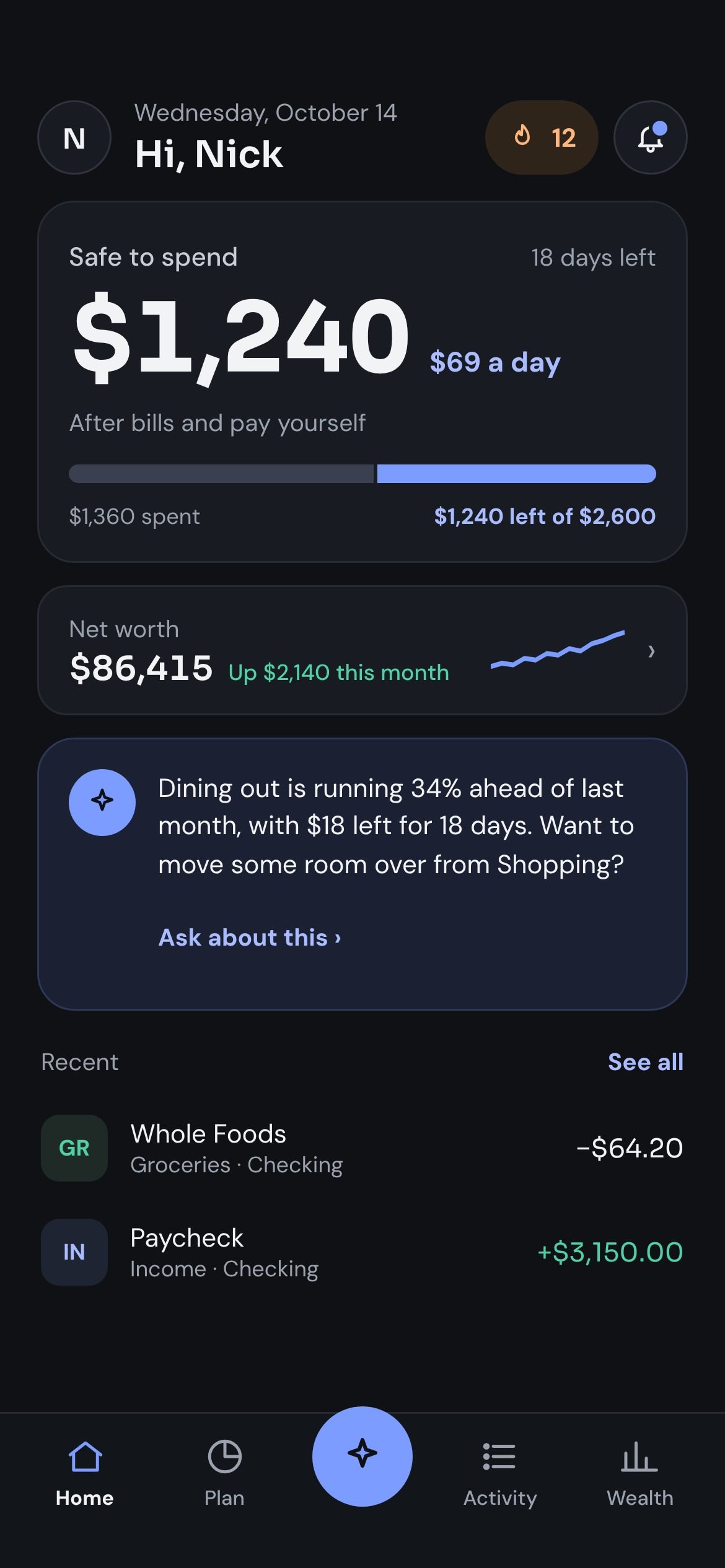
Safe to spend
One number you can actually trust.
Your bank shows what’s in the account. Spud shows what’s yours to spend after bills and paying yourself, with a daily amount so you can pace the month.
Payday list
Payday, handled.
When your paycheck lands, Spud lists the moves to make: savings, extra payments, set-asides. You make them in your bank’s app, and Spud checks each one off when it sees it land.
- Done:New carTo High-yield Savings ••0937$300
- Done:Extra loan paymentTo Personal loan$150
- Done:Set-asidesTo High-yield Savings ••0937$20
Spud is read-only and never moves money. You make each move in your bank’s app; Spud checks it off when it lands.
Can I afford it?
Ask before you buy.
Type in a price and see if it fits, what it leaves you per day, and whether it touches any of your goals.
Heads up
Heads up before you dip.
Spud looks 30 days ahead at your bills and paydays. If an autopay is going to land before your paycheck, you hear about it early, with ways to cover it.
Your Cash Back autopay ($990) comes out on the 28th, and your paycheck doesn’t land until the 30th.
Partner
Plan it together.
Share a household budget with a partner and see who paid what. You choose what they can see, account by account. Partner sharing is included in every plan.
Ask Spud
Ask Spud anything about your money.
Ask in plain words, like “Can I afford a trip in March?” Spud answers using your accounts and your plan. It can be wrong, and it isn’t financial advice.
Can I afford a $2,400 trip in March?
Yes, if you start now. You have $1,450 in your Travel fund, so you need $950 more, about $190 a month through February.
Answers by Claude (Anthropic). Can be wrong. Not financial advice.
App screens show sample data.
Why Spud
Why not just use…
| What you get | Your bank app | A spreadsheet | Most budgeting apps | Spud |
|---|---|---|---|---|
| What you can spend today | Your balance, bills included | If you keep it updated | Category budgets to add up | One number, every day |
| Before a bill overdraws you | A low-balance alert, once it’s already low | Only if you check it | Some show upcoming bills | A heads-up up to 30 days ahead |
| Time it takes | None | Hours a month | Setup, then sorting purchases | A 30-second check-in |
| Price | Free | Free | $95 to $110 a year | $79.99 a year |
“Most budgeting apps” is what the best-known budgeting apps charge per year, as of October 2026.
Read-only, on purpose.
Read-only bank connections
Spud connects to your bank through Plaid with read-only access.
Spud can’t move money
It can’t make payments or transfers. Any move is yours to make, in your bank’s app.
We never sell your data
Not your transactions, not your email. Never.
Delete anytime
Delete your account and your data whenever you want.
Why I built Spud
I got frustrated. Every budgeting app I tried took days to set up and turned into one more thing to keep up with. I wanted something that fits into my life, not something I have to make time for.
A budgeting app should feel like asking a friend for help.
So I’m building Spud myself, and every reply to the waitlist email comes to me.
One plan. Everything in it.
Try all of Spud free for 14 days, then pick monthly or yearly. Partner sharing is included.
Monthly
$9.99 / month
After a 14-day free trial
Yearly
Save 33%$79.99 / year
About $6.67 a month, after a 14-day free trial
- 14-day free trial
- Partner sharing included
- Cancel anytime
Questions
Is my bank data safe?
Spud connects through Plaid with read-only access, so it can see balances and transactions but can’t move money. Your bank password goes to your bank or to Plaid, never to Spud. We never sell your data.
Which banks work with Spud?
Most US banks, credit unions and credit cards work with Spud through Plaid. When you connect in the app, you can search for yours.
Can I cancel anytime?
Yes. Spud is billed through the App Store, so you cancel in your iPhone’s subscription settings. Cancel during the 14-day trial and you’re not charged.
Is Spud on Android?
Not yet. Spud is launching on iPhone first.
When does Spud launch?
Spud is in testing on iPhone now. There’s no launch date yet. Join the waitlist and we’ll email you the day it’s in the App Store.
Know what you can
actually spend.
Spud is almost ready for iPhone. Join the waitlist and we’ll tell you the day it’s out.
We’ll email you about Spud’s launch. Unsubscribe anytime.